Getting Started with AI Veterinary Documentation: Simplicity First, Optimization Later

You've decided to adopt AI-powered documentation for your veterinary practice.
Congratulations! You're about to reclaim hours of your day, eliminate after-hours charting, and rediscover what it feels like to leave work on time.
But now comes the question that stops many veterinarians before they even begin: "How do I set this up? Do I need to configure templates first? Should I train my entire team? What about my existing workflow?"
Here's the truth that most AI scribe companies won't tell you: you don't need to figure all of that out before you start.
The beauty of modern veterinary AI documentation is that you can begin creating value immediately with just two steps: login and record. Everything else can be optimized later, as you discover what works for your specific practice.
The Two-Step Start: Login and Record
Getting started with Manta requires exactly two actions:
Login: Open Manta on your phone, tablet, or computer and sign in. That's it.
Record: Hit the record button and start documenting your next patient visit.
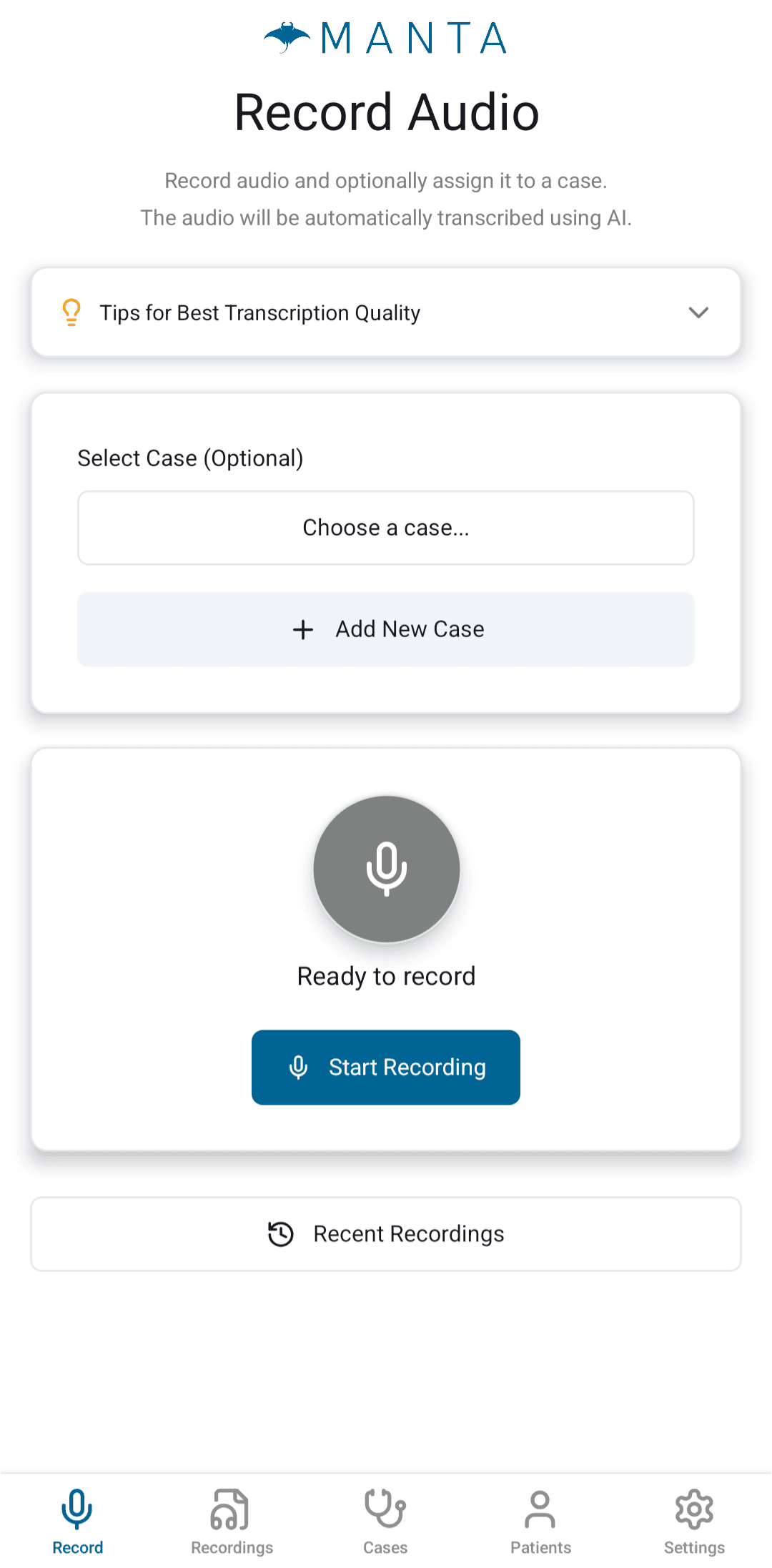
No template setup required. No workflow redesign needed. No team training necessary. Just login and record.
Your voice observations are immediately transcribed with veterinary-specific accuracy, capturing medical terminology correctly the first time. You now have a searchable, accurate transcript of your patient encounter.
That alone saves time compared to typing or handwriting notes from memory hours later. But more importantly, you've started. You're using the technology. You're learning how it feels in real practice conditions.
From this foundation, you can build toward more sophisticated workflows at your own pace.
Why "Start Simple" Matters
Many veterinarians delay AI adoption because they feel overwhelmed by setup decisions. They think they need to:
Create perfect templates before recording their first case
Redesign their entire practice workflow
Train their complete team simultaneously
Figure out exactly how to integrate with their PIMS
Establish comprehensive protocols for every scenario
This approach leads to analysis paralysis. Weeks or months pass while you research, plan, and prepare, but you're not actually using the technology or experiencing any time savings.
The "start simple" philosophy flips this entirely:
Start using AI documentation immediately with minimal setup. Learn what works through actual use, not theoretical planning.
Optimize based on real experience, not assumptions about what you might need.
This approach delivers immediate value while allowing you to discover the workflow optimizations that matter for your specific practice.
The Natural Progression: From Basic to Optimized
Once you're comfortable with basic voice recording, you can progressively add optimization layers. Most veterinarians achieve basic mastery within the 14-day free trial, with full optimization developing over the following months.
Days 1-3: Just Record
For your first few days, simply record patient encounters. Don't worry about perfect formatting or comprehensive notes. Just capture your observations by voice instead of typing them later.
What you'll learn:
How voice documentation feels during actual patient encounters
Which case types benefit most from voice recording
Whether you prefer recording during exams or immediately after
How clients respond to voice documentation in the exam room
What you'll gain: Even with minimal optimization, you're saving time by speaking instead of typing. You're also creating searchable transcripts you can reference later.
Days 4-7: Basic Organization
Once voice recording feels natural, start organizing your cases more intentionally:
Create patient records for clients you see regularly
Assign recordings to specific cases
Review and edit transcripts between appointments
Experiment with different recording approaches for different case types
What you'll learn:
Which patients need comprehensive documentation vs. brief notes
How much editing your transcripts typically require
Where voice documentation creates the most time savings
What information you consistently forget to capture
What you'll gain: Your documentation is becoming more organized and comprehensive. You're building a library of well-documented cases that will be valuable for future reference.
Days 8-14: Template Introduction and Core Workflow
By your second week, you'll start noticing patterns: "I always document physical exams in the same order," or "My surgical notes always include the same sections."
This is the perfect time to introduce templates. Not because you have to, but because you've identified specific structures that would benefit from automation.
With Manta's AI Template Builder, you can create templates conversationally in under a minute:
"Build me a wellness exam template with sections for history, physical exam by body system, assessment, and plan"
The AI constructs the template structure instantly. You record your next wellness exam, select this template, and generate a fully formatted note with one click.
What you'll learn:
Which case types benefit most from templates
How templates should be structured to match your documentation style
What information you want auto-populated vs. manually added
What you'll gain: Documentation that used to take 10-15 minutes now takes 2-3 minutes. You're finishing notes during or immediately after appointments instead of staying late. By the end of your 14-day trial, you have basic mastery of the core workflow that's already transforming your daily documentation burden.
Weeks 3+: Advanced Features and Team Integration
Once your personal workflow is optimized, you can explore advanced features and begin involving your team:
Use Generated Differentials for complex cases
Leverage the AI Assistant for dose calculations and treatment protocols
Generate automatic Discharge Instructions for clients
Share templates with team members
Implement collaborative documentation for multi-doctor cases
What you'll learn:
How AI can support clinical decision-making, not just documentation
Where team collaboration creates the most value
Which advanced features fit naturally into your workflow
What you'll gain: A comprehensive AI-powered documentation and clinical support system that feels like a natural extension of your practice, not an added burden.
Customizing for Your Practice: Questions to Consider
As you progress beyond the basic "login and record" phase, these questions will help guide your optimization:
Recording Workflow
When will you record?
During the exam while examining the patient?
Immediately after the exam while details are fresh?
Multiple times throughout the day, compiled into one note?
There's no universally correct answer. Experiment to discover what feels most natural for your practice style and client communication preferences.
What device will you use?
Your phone (portable, always with you, good audio quality)?
A tablet in each exam room (shared device, larger screen)?
Your computer (convenient for immediate review and editing)?
Many veterinarians find their phone is ideal: it's already with them, audio quality is excellent, and it's unobtrusive during exams. But the best device is the one you'll actually use consistently.
Team Involvement
Who creates patient records?
Initially, you might create them yourself as needed. As you optimize, you might have technicians pre-load your schedule each morning so patient records are ready when you arrive.
Who records patient histories?
Some practices have technicians record the initial history, then veterinarians add their examination findings. Others have veterinarians handle all recording to maintain consistency.
Who handles PIMS transfer?
You might export notes yourself initially. Later, you might delegate this to technicians once notes are reviewed and finalized.
None of these decisions need to be made before you start using the technology. Make them gradually as you discover what creates the most efficiency for your specific practice.
Consent and Client Communication
One decision worth making early is how you'll approach client consent for recording:
Verbal Consent
Many veterinarians simply say at the start of appointments: "I'm using technology that helps me document everything accurately while staying focused on [patient name]. Is that okay with you?"
This brief explanation positions the technology as benefiting the client (you're more focused on their pet) while getting clear permission.
Signage
Some practices post notices in exam rooms or waiting areas indicating that recordings may occur during appointments for medical record purposes.
Written Consent
Practices can incorporate recording consent into intake paperwork, though this is often unnecessary if you're obtaining verbal consent at each appointment.
Consult your state's recording consent laws and your legal advisor to ensure compliance, but don't let this become a barrier to getting started. Most veterinarians find that clients appreciate the transparency and recognize that better documentation benefits their pet's care.
Device Management
Personal vs. Shared Devices
Personal devices (each veterinarian uses their own phone):
No login/logout between users
Device always ready to record
Familiar interface
Easy to use between appointments or at home
Shared devices (exam room tablets or computers):
Accessible to multiple team members
May require login/logout between users
Remains in exam rooms for consistent access
Both approaches work. Choose based on your practice structure and preferences.
Best Practices That Emerge Through Use
Certain best practices become apparent as you use AI documentation regularly:
Signposting for Clarity
The AI organizes your notes better when you verbally signpost what you're doing:
"Now I'm examining Bella's cardiovascular system. Heart rate is 120 beats per minute, rhythm is regular, no murmurs detected..."
"Moving on to the abdominal palpation. No masses, no pain response, normal organ size..."
This structured narration helps the AI understand where information belongs while also keeping your exam organized and thorough.
Natural Language Works
You don't need to speak in formal medical terminology if that's not your style. The AI understands context and can convert conversational language to appropriate medical terms:
You say: "Her ears look really red and inflamed with a lot of dark, waxy buildup"
AI captures: "Bilateral otitis externa with erythema, inflammation, and dark ceruminous debris"
Speak naturally. The AI handles the translation.
Multiple Recordings Compile
You don't need to capture everything in one perfect recording. Throughout the day, you can:
Record initial exam findings
Add diagnostic results later
Include treatment details when administered
Document client communication at discharge
When you're ready, generate one comprehensive note from all recordings. This flexibility accommodates the reality of how veterinary cases unfold over time.
Integration with Your PIMS
Eventually, you'll want to transfer your AI-generated notes into your practice management system. The good news: this doesn't need to be complicated.
For Cloud-Based PIMS: The Manta Chrome Extension enables one-click export directly from your browser. Your formatted notes transfer seamlessly without manual copying and pasting.
Direct PIMS Integrations (Coming April/May 2026): Manta is launching native integrations with major practice management systems, enabling automatic bidirectional sync between Manta and your PIMS:
Avimark
Impromed
Pulse
DaySmart
Rhapsody
Shepherd
Cornerstone
VetSpire
With these integrations, patient information flows automatically from your PIMS into Manta, and completed notes sync back to the appropriate patient records - no manual export required.
For Other Systems: You can export notes and transfer them via your preferred method. Many veterinarians initially handle this themselves, then delegate to technicians once they've established their review process.
But again, this doesn't need to be figured out on day one. You can start using AI documentation and worry about PIMS integration later once you're consistently creating notes you want to transfer.
The Philosophy: Remove Barriers, Add Value Gradually
Traditional software implementations follow the "big bang" approach: extensive planning, comprehensive training, coordinated launch date, and hopefully everything works as designed.
Modern AI documentation enables a different philosophy: immediate value with minimal barrier to entry, progressive optimization based on actual experience, and continuous improvement as you discover what matters for your specific practice.
This approach has profound psychological benefits. Instead of delaying AI adoption until you've answered every question and planned every detail, you start experiencing time savings immediately. This creates momentum and motivation to continue optimizing.
Instead of feeling overwhelmed by all the features and possibilities, you discover capabilities gradually as you're ready for them. This makes the learning curve manageable and the
technology accessible.
Instead of forcing your practice to adapt to rigid software requirements, you adapt the technology to fit your existing workflow, then refine both together over time.
Your Next Step
If you've been hesitating to adopt AI documentation because it seems complicated or overwhelming, this is your permission to start simple:
Record your next patient encounter
Review the transcript
That's it. That's your first step.
Everything else can come later: templates when you're ready for them, team integration when it makes sense, advanced features when you've mastered the basics, PIMS integration when you've established your workflow.
The perfect setup doesn't happen before you start. It emerges through use, experimentation, and gradual optimization based on your real practice experience.
The technology is ready when you are. And you're ready right now, even if you don't have everything figured out.
Login and record. The rest will follow.
Ready to start with AI veterinary documentation? Contact us to begin your journey with Manta's simple two-step approach: login and record, then optimize as you go.
This information is for general education and should not be considered legal advice. Laws can change, and specific situations may have additional considerations. We always recommend getting familiar with your local laws to ensure compliance, and consulting a legal advisor to cover your bases or where you have questions.